DNS For Devops
DNS for DevOps
Part of the [[10 minute devops]] series
Introduction
DNS is one of the most used and least understood protocols on the internet. Most of the time it works quietly in the background, but DNS problems are often involved in major outages and confusing "works for me" bugs.
This guide is for developers and DevOps engineers who need to debug DNS issues, configure DNS records, and understand how DNS affects HTTP services, TLS, email, and cloud infrastructure.
By the end, you should understand:
- how DNS names are resolved;
- how local files such as
/etc/hostsand/etc/resolv.confaffect lookups; - how delegation lets different teams or systems manage different parts of a domain;
- what common DNS record types are used for;
- how to approach DNS troubleshooting.
Contents
- Definitions
- Quick summary of DNS
- How DNS resolution works in practice
- Types of DNS record
- DNS troubleshooting checklist
- Useful commands
Definitions
URI: A string of characters used to identify a resource. In most cases, the more specific term URL is used instead.
URL: A type of URI that identifies a resource and describes how to locate it. A URL usually includes a scheme, host, optional port, and path.
Scheme/protocol: The initial part of a URL that defines which protocol is used, such as https, ftp, or git+ssh.
Host / hostname: The DNS name or IP address in a URL. In https://auth.eval.internal.artran.co.uk:443/, the host is auth.eval.internal.artran.co.uk.
Subdomain: A domain below another domain. In auth.eval.internal.artran.co.uk, internal.artran.co.uk, eval.internal.artran.co.uk, and auth.eval.internal.artran.co.uk can all be considered subdomains depending on context.
Registered domain: The domain purchased or managed at a registrar, such as artran.co.uk.
TLD / public suffix: The highest-level part controlled by a registry, such as .com, .net, .co.uk, or .uk. Some public suffixes contain more than one label, such as .co.uk.
Port: A number after the host that specifies which port to connect to. This is usually omitted when the default port is used.
Example:
https://auth.eval.internal.artran.co.uk:443/
- Scheme:
https - Host:
auth.eval.internal.artran.co.uk - Registered domain:
artran.co.uk - Subdomains:
internal.artran.co.uk,eval.internal.artran.co.uk,auth.eval.internal.artran.co.uk - TLD / public suffix:
.co.uk - Port:
443, the default port for HTTPS
There are more parts to most URLs, but they are not needed for this DNS overview.
Quick summary of DNS
DNS is a distributed database that converts human-friendly names into values that are useful to software.
The most common use is converting a hostname into an IP address. For example, when a browser visits a website, it usually needs to resolve the hostname into an IPv4 address such as 123.45.67.89 or an IPv6 address.
DNS is also used for other service metadata. For example, MX records tell mail servers where to deliver email, and SRV records advertise the hostname and port for some services.
DNS is distributed for scalability and high availability. No single DNS server can answer every possible query. Instead, DNS uses delegation. Each server either answers for a zone it controls or refers the resolver to another server that is closer to the answer.
There are three useful roles to understand:
- Stub resolver: The resolver on your machine. It usually asks another DNS server for help.
- Recursive resolver: A DNS server that follows delegations until it finds an answer. Examples include corporate DNS, ISP DNS,
1.1.1.1, and8.8.8.8. - Authoritative nameserver: A DNS server that owns records for a specific zone, such as
artran.co.uk.
How DNS resolution works in practice
Note: This section has a Linux bias. macOS is very similar, though some details are handled by Apple-specific services. Windows uses the same DNS concepts, but some files and tools have different names.
Two files commonly affect DNS resolution on Linux machines: /etc/hosts and /etc/resolv.conf. Both are useful for developers, but both can also cause confusing local-only behaviour.
The /etc/hosts file
On many Linux systems, name lookup order is controlled by /etc/nsswitch.conf. A common configuration checks /etc/hosts before DNS.
This is useful when you want to override DNS on one machine.
For example, assume you have deployed a server called customer.artran.co.uk, but the customer wants to use artran.customer.com. Eventually, the customer should add a CNAME record. While waiting for that, you can test locally by adding a hosts-file entry that maps the desired name to the server or load balancer IP address:
artran.customer.com 12.34.5.67
Another common use is local HTTPS development. Browsers and TLS certificates can behave differently with localhost. Using mkcert, you can create a locally trusted certificate for a development domain, then map that name to localhost:
my-local.artran-software.com 127.0.0.1
You can then use a URL such as https://my-local.artran-software.com:8443 to reach a local service running on port 8443.
The /etc/resolv.conf file
/etc/resolv.conf tells the local resolver which DNS servers and search domains to use. Two common entries are:
nameserver: Tells the resolver which DNS server to ask. This is often set by DHCP. DHCP, or Dynamic Host Configuration Protocol, is commonly used to assign IP addresses and DNS settings to machines on a network.search: Tells the resolver which domains it should treat as local search suffixes. For example, withsearch artran.co.uk, some tools may tryfoobar.artran.co.ukwhen you runcurl foobar.
Search domains can be convenient, but they can also make behaviour less obvious. Prefer fully qualified names when debugging DNS.
Recursion
No DNS server knows how to resolve every valid address. Recursive resolvers find answers by walking the DNS delegation tree.
A recursive lookup usually works like this:
- Ask a root nameserver where to find
.uk. - Ask a
.uknameserver where to findartran.co.uk. - Ask the
artran.co.ukauthoritative nameserver forwww.artran.co.uk. - Cache the answer until its TTL expires.
By default, dig asks for recursive resolution, so this process is usually hidden. You can disable recursion with:
dig +norecurse www.artran.co.uk
This is likely to return an empty answer unless there is a recent lookup cached. We can replicate what a recursive resolver normally does by querying each level directly.
Root nameservers are built into resolver software. They have names such as a.root-servers.net; currently the first letter ranges from a to m.
dig +norecurse www.artran.co.uk @g.root-servers.net

; <<>> DiG 9.10.6 <<>> +norecurse www.artran.co.uk @g.root-servers.net
;; global options: +cmd
;; Got answer:
;; ->>HEADER<<- opcode: QUERY, status: NOERROR, id: 13350
;; flags: qr; QUERY: 1, ANSWER: 0, AUTHORITY: 8, ADDITIONAL: 17

;; QUESTION SECTION:
;www.artran.co.uk.      IN  A

;; AUTHORITY SECTION:
uk.             172800  IN  NS  nsd.nic.uk.
uk.             172800  IN  NS  dns1.nic.uk.
uk.             172800  IN  NS  nsa.nic.uk.
uk.             172800  IN  NS  dns3.nic.uk.
uk.             172800  IN  NS  dns4.nic.uk.
uk.             172800  IN  NS  nsc.nic.uk.
uk.             172800  IN  NS  nsb.nic.uk.
uk.             172800  IN  NS  dns2.nic.uk.

;; ADDITIONAL SECTION:
dns4.nic.uk.        172800  IN  A   43.230.48.1
dns3.nic.uk.        172800  IN  A   213.248.220.1

;; Query time: 21 msec
;; SERVER: 2001:500:12::d0d#53d0d
;; WHEN: Wed Jul 01 11:56:50 BST 2026
;; MSG SIZE  rcvd: 500
The root server does not know the final answer, but it points us at nameservers for .uk. Next, ask one of those:
dig +norecurse www.artran.co.uk @dns1.nic.uk

; <<>> DiG 9.10.6 <<>> +norecurse www.artran.co.uk @dns1.nic.uk
;; global options: +cmd
;; Got answer:
;; ->>HEADER<<- opcode: QUERY, status: NOERROR, id: 45609
;; flags: qr; QUERY: 1, ANSWER: 0, AUTHORITY: 4, ADDITIONAL: 1

;; QUESTION SECTION:
;www.artran.co.uk.      IN  A

;; AUTHORITY SECTION:
artran.co.uk.       172800  IN  NS  ns-120.awsdns-15.com.
artran.co.uk.       172800  IN  NS  ns-653.awsdns-17.net.
artran.co.uk.       172800  IN  NS  ns-1435.awsdns-51.org.
artran.co.uk.       172800  IN  NS  ns-1653.awsdns-14.co.uk.

;; Query time: 20 msec
;; SERVER: 2a01:618:400::1#531
;; WHEN: Wed Jul 01 11:56:50 BST 2026
;; MSG SIZE  rcvd: 180
The .uk server points us at the authoritative nameservers for artran.co.uk:
dig +norecurse www.artran.co.uk @ns-120.awsdns-15.com

; <<>> DiG 9.10.6 <<>> +norecurse www.artran.co.uk @ns-120.awsdns-15.com
;; global options: +cmd
;; Got answer:
;; ->>HEADER<<- opcode: QUERY, status: NOERROR, id: 55090
;; flags: qr aa; QUERY: 1, ANSWER: 1, AUTHORITY: 4, ADDITIONAL: 1

;; QUESTION SECTION:
;www.artran.co.uk.      IN  A

;; ANSWER SECTION:
www.artran.co.uk.   300 IN  A   207.38.94.37

;; AUTHORITY SECTION:
artran.co.uk.       172800  IN  NS  ns-120.awsdns-15.com.
artran.co.uk.       172800  IN  NS  ns-1435.awsdns-51.org.
artran.co.uk.       172800  IN  NS  ns-1653.awsdns-14.co.uk.
artran.co.uk.       172800  IN  NS  ns-653.awsdns-17.net.

;; Query time: 11 msec
;; SERVER: 2600:9000:5300:7800::1#531
;; WHEN: Wed Jul 01 11:56:50 BST 2026
;; MSG SIZE  rcvd: 196
Now we have the address, so the browser or other client can connect to the correct server.
TTL and caching
Every DNS answer has a TTL, or time to live. The TTL tells resolvers how long they may cache the answer.
A low TTL, such as 60 or 300 seconds, is useful before migrations because it allows changes to take effect quickly. A higher TTL reduces DNS traffic and improves cache efficiency.
Changing a record does not instantly update every client. Some resolvers may continue using the old value until the previous TTL expires. When planning a migration, lower the TTL ahead of time, wait for the old TTL to expire, then make the change.
DNS delegation
DNS delegation means splitting a domain into smaller zones and assigning authority for those zones to different nameservers.
This is useful for administration. It can reduce the number of records in each zone and allows different teams or systems to manage different subdomains.
For example, imagine a corporate domain, artran.co.uk, used to host single-tenant services for large pharmaceutical companies. A customer called BigPharma Inc might use the delegated subdomain bigpharma.artran.co.uk. Individual services could then be named design.bigpharma.artran.co.uk, make.bigpharma.artran.co.uk, and so on.
To delegate the subdomain:
-
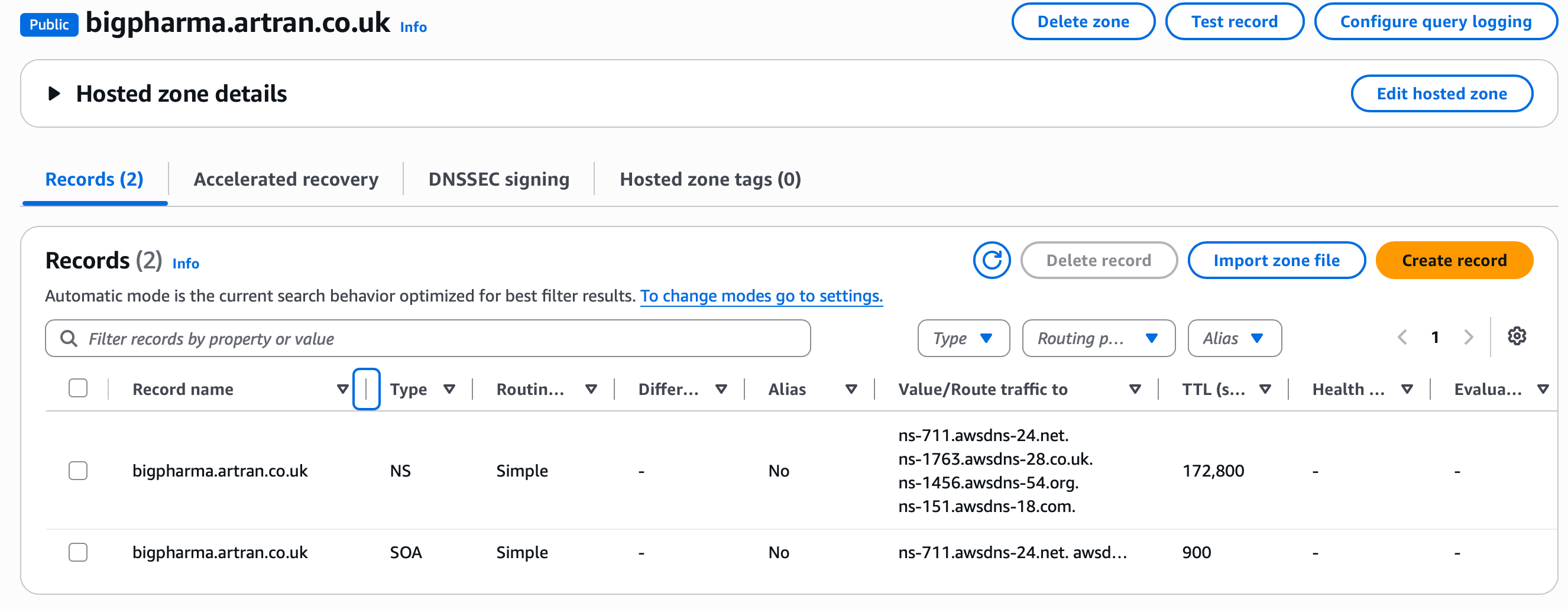
Create a new DNS zone called
bigpharma.artran.co.ukin the DNS management system. This creates severalNSrecords in the new zone.
-
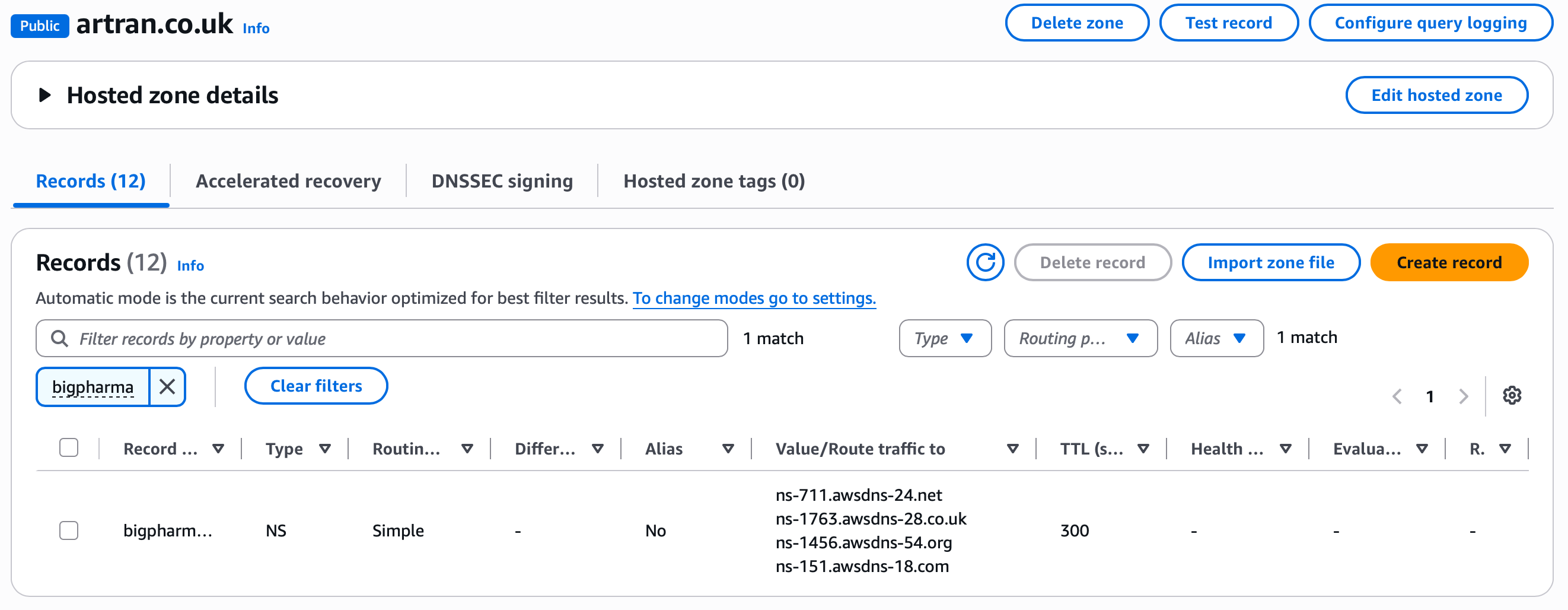
In the parent zone,
artran.co.uk, create oneNSrecord for each authoritative nameserver assigned to the child zonebigpharma.artran.co.uk.
-
Create records for
design.bigpharma.artran.co.uk,make.bigpharma.artran.co.uk, and other customer services in the newbigpharma.artran.co.ukzone.
Types of DNS record
A and AAAA
These are the most common record types. They map a name to an IP address.
Arecords map to IPv4 addresses.AAAArecords map to IPv6 addresses.
CNAME
A CNAME maps one name to another name.
For example, the pharma company from earlier could create a CNAME from design.bigpharma.com to design.bigpharma.artran.co.uk. A browser using design.bigpharma.com would then resolve through to the service behind design.bigpharma.artran.co.uk.
Following a CNAME is usually transparent to the user.
For HTTPS, the TLS certificate must match the hostname the user entered. In this example, the certificate must be valid for design.bigpharma.com, not just for design.bigpharma.artran.co.uk.
SRV
SRV records advertise where a service is available. They include priority, weight, port, and target hostname.
They are commonly used by protocols such as SIP, XMPP, LDAP, and some service-discovery systems. The target hostname still needs an A or AAAA lookup before a client can connect.
PTR
PTR records are the inverse of A and AAAA records. They map IP addresses back to names.
They are commonly used for email delivery and reputation checks, so setting them up correctly can be critical for reliable email.
PTR records live in special reverse DNS zones such as in-addr.arpa for IPv4 and ip6.arpa for IPv6.
MX
MX, or Mail eXchanger, records tell SMTP servers how to deliver email for a domain.
MX records include a priority value. Lower numbers are preferred.
TXT
TXT records assign plain text data to a domain. There are few restrictions on what they can contain, but they usually contain either a short string or key=value data.
Common uses include SPF, DKIM, DMARC, domain verification, and ACME DNS-01 certificate challenges.
NS
NS records say which nameservers should be used to resolve a domain or delegated zone. See DNS delegation.
SOA
SOA, or Start of Authority, records store important information about a domain or zone. This includes the administrator contact, serial number, refresh interval, retry interval, expiry time, and default TTL values.
DNS troubleshooting checklist
When DNS behaves unexpectedly, check:
- What exact name are you resolving?
- What record type are you asking for:
A,AAAA,CNAME,MX,TXT, or something else? - Which resolver are you using?
- Is the answer coming from cache?
- What is the TTL?
- Which nameserver is authoritative for the zone?
- Does the result differ between public DNS, corporate DNS, and VPN DNS?
- Does
/etc/hostsoverride the DNS result? - Are IPv4 and IPv6 returning different answers?
- Does the TLS certificate match the hostname the user entered?
Useful commands
# Basic lookup using the system-configured resolver
dig example.com

# Query specific record types
dig A example.com
dig AAAA example.com
dig MX example.com
dig TXT example.com
dig NS example.com

# Show the delegation path
dig +trace example.com

# Query a specific resolver
dig @1.1.1.1 example.com
dig @8.8.8.8 example.com

# Print only the answer value
dig +short example.com

# Reverse DNS lookup
dig -x 8.8.8.8